

Cary Tiernan
Head of Product Marketing, Reevo
On this page
Get our newsletter, The GTM Source
No Bot Required: Meet Bot-Free Video Recording
Reevo’s desktop app, available for Mac, now records meeting video and audio without a bot joining the call. Here’s why we built this feature and how it works.
Cary Tiernan
Head of Product Marketing, Reevo
Published Nov 17, 2026
Key takeaways
- Bot-free video recording in the Reevo desktop app records a meeting's video and audio from your computer, so no bot joins the call. It works with Zoom, Google Meet, and Microsoft Teams, including calls the buyer hosts.
- You pick a single window or your full screen, and the recording stays on your Mac until you choose to upload it to Reevo. Once you upload it, the recording is attached to the meeting and linked to the related deal, account, and contacts.
- Bot-free doesn't mean secret, so tell everyone on the call you're recording and get their OK first. If you'd rather use a meeting bot, Reevo still offers one.
On this page
Key takeaways
- Bot-free video recording in the Reevo desktop app records a meeting's video and audio from your computer, so no bot joins the call. It works with Zoom, Google Meet, and Microsoft Teams, including calls the buyer hosts.
- You pick a single window or your full screen, and the recording stays on your Mac until you choose to upload it to Reevo. Once you upload it, the recording is attached to the meeting and linked to the related deal, account, and contacts.
- Bot-free doesn't mean secret, so tell everyone on the call you're recording and get their OK first. If you'd rather use a meeting bot, Reevo still offers one.
“Sorry, can you let my notetaker in?”
“Hold on, I think your meeting bot joined twice?”
“Whose AI recorder is that?”
These are strange ways to open a sales call. Yet here we are: two people, three bots, and plenty of confusion.
Meeting bots solve a real problem. Someone has to take notes, and it should never be the sales rep running discovery, watching the clock, and trying to remember the name of the VP who just joined. So we send bots.
But meeting bots show up as a black square called "Notetaker," say nothing, and sit there like the intern no one introduced.
So we’ve made ours optional. Bot-free video recording in the Reevo desktop app records your meetings, video included, without anything joining the call. Prefer the bot? It's still around. It just doesn't have to come to every meeting.
What is Reevo’s Bot-Free Video Recording?
Bot-free video recording lets the Reevo desktop app capture a meeting’s video and audio right from your Mac.
No extra attendee, no waiting room. No one has to ask, “Wait, who invited that?”
You choose what gets recorded, whether a single window like your Zoom call or your full screen. Reevo captures your mic and the call’s audio, so both sides of the conversation make it into the recording.
And the recording stays on your laptop until you decide to upload it to Reevo. Your call, literally.
Why We Built This: The Trouble with Meeting Bots
Meeting bots solved the note-taking problem, then created a few new ones. Ask any sales rep who’s opened a call by apologizing for their notetaker, and you’ll hear some version of these reasons why you might be better off without a meeting bot.
Bots make buyers guarded
People talk differently when there's a stranger in the room, even one that's just a gray tile with a name. A bot joins and the call shifts from conversation to deposition. Buyers pick their words more carefully and think out loud a little less. Thinking out loud is the part you actually want.
With nothing joining the call, it's just two people talking. That's how good sales conversations are supposed to feel.
Bots don’t always make it in
Bots get stuck, especially on calls the buyer hosts. Their IT team may block outside bots. Their meeting settings may park yours in the lobby. The worst version goes like this: The buyer finally names their budget, and your bot is still in the waiting room.
Bot-free video recording runs on your own Mac, so there’s no bot for the host to admit. Buyer-hosted calls work the same way: you still get everyone’s OK before recording.
Audio only tells half the story
A transcript tells you what was said. It doesn't show the pricing slide the buyer asked you to go back to, or the demo screen where they leaned in. It also misses the face they made when you said the number.
Video captures what’s visible in the window or screen you choose. If a pricing slide, demo, or buyer’s reaction was visible there, you can scrub back to it and share the moment with the solutions engineer who wasn’t on the call.
Get our newsletter, The GTM Source
How to Record a Meeting Without a Bot
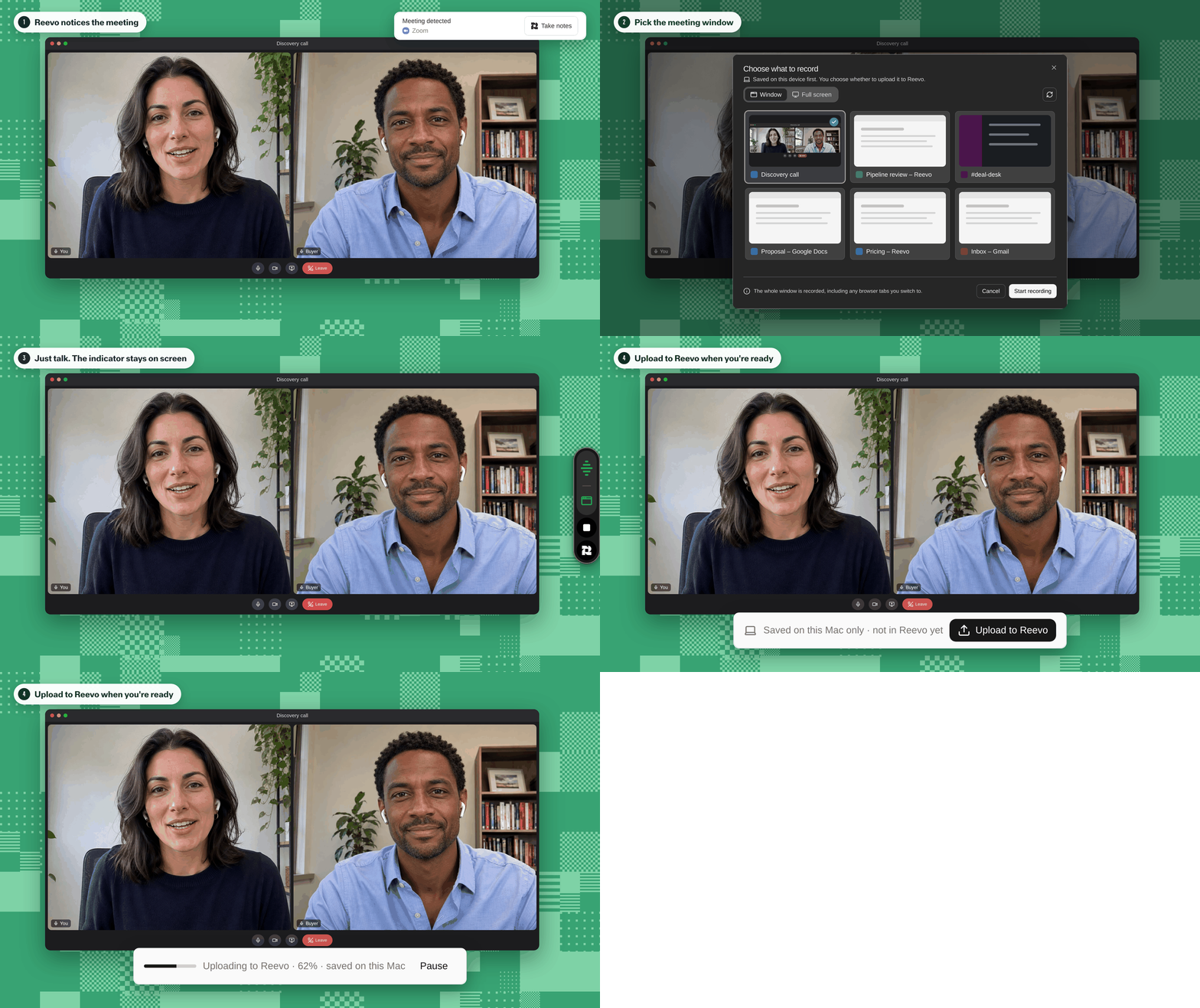
Good news: There's no lobby to babysit and no awkward bots.
If the Reevo desktop app is on your Mac, you can start recording in the time it takes to say hello. Here's how it works:
- Reevo notices the meeting. When Zoom, Microsoft Teams, a Slack huddle, or FaceTime starts using your mic, the desktop app offers to record. No digging through menus while your buyer waits.
- Pick what to record. Choose the meeting window or your whole screen. Sharing a demo across two apps? Go full screen.
- Ask, then hit record. More on this in a second.
- Just talk. A small recording indicator with a live waveform stays on screen, so you always know it’s running. If the call’s audio drops out, it tells you instead of failing quietly.
- Upload when you’re ready. The recording lives on your Mac until you send it to Reevo. Once it’s uploaded, it lands on the meeting in Reevo, right next to the deal it belongs to.
Then Reevo gets to work. For scheduled meetings, you get prep before the call, and afterward a summary with a link straight to the video. Reevo pulls action items from what was said and drafts the follow-up, so you can hang up and hit send. Recording a quick, unscheduled call? You can link it to the right deal or contact yourself.
That's the real difference. A recording is only worth something if it reaches the deal. Otherwise it's just a very long video sitting in a folder called "Calls (FINAL) (2)."
A quick word on consent
Bot-free doesn’t mean secret. Before you record, tell everyone on the call and get their OK. Follow the recording laws that apply to your meeting and your company’s policy.
“Mind if I record so I can focus on you instead of my notes?” is a simple way to ask. If someone joins later, let them know and get their OK before continuing. The indicator on your screen shows that a recording is running; it doesn’t replace that conversation.
Taking Reevo Wherever You Work
Bot-free recording is the newest way Reevo shows up for meetings, but it’s far from the only place Reevo shows up.
Sales doesn’t happen in one tab. It happens in a calendar invite, a Slack thread, a LinkedIn profile, the back of a rideshare, and the two minutes before a call. So that’s where Reevo is.
- The web app is your home base with your pipeline, deals, and forecast, plus Ask Reevo to dig deeper.
- The desktop app catches your meetings as they start, records them bot-free on Mac, and keeps prep a click away.
- The mobile app preps you for a meeting from the lobby, review a conversation on the way back, place a call, or scan a business card before the trade show coffee wears off.
- The Chrome extension brings Reevo into LinkedIn and Google Meet, so you don't have to toggle between tabs mid-research or mid-call.
- The Reevo for Slack bot lets you tag Reevo to ask questions and receive updates without leaving the channel where everyone's already asking about the deal.
Every surface shares the same memory. A call you record on your Mac shows up on the deal in the web app. Its action items are there when you open the mobile app before your next meeting, and its answers turn up when your manager asks Reevo in Slack.
Bots Optional, Conversations Required
Meeting bots still have their place, and ours is still here when you want it. But buyers deserve a conversation, not a deposition. And sales teams deserve to be fully present on the call, not wondering whether the bot got in.
With bot-free video recording, you capture your chosen window or screen alongside the conversation, without adding another attendee. Get everyone’s OK, then focus on the call. Reevo takes it from there.
See what the Reevo desktop app can do, and leave the bot behind.
Bot-Free Video Recording FAQs
Yes. If you'd rather send a bot, you can still record with one from a meeting link. Bot-free recording just means you don't have to.
Reevo’s bot-free video recording works with the meeting apps you already use, including Zoom, Google Meet, and Microsoft Teams. Because you choose a window or your full screen to record, the meeting app doesn't need a special integration.
Reevo’s desktop app is currently available for Macs.
Yes. You can turn video off and record audio only, the way the Reevo desktop app already did before video recording arrived.
Bot-free doesn't mean secret. Tell meeting attendees that you're recording the call and get their OK before you start. Aside from doing so out of respect, recording laws vary by location, and your company may have its own policy.
Reevo’s desktop app has a recording indicator that stays on your screen the whole time.
Each bot-free video recording stays on your Mac until you choose to upload it to Reevo. Once it's uploaded, it's attached to the meeting in Reevo and linked to the related account, contacts, and deal.
A force multiplier for sales teams.
Get started


