7 Best Power Dialer Software Tools for Sales Teams (2026)
Compare power dialers by features, fit, and pricing. Find the right software so your sales and revenue team can spend more time selling.


Sales reps have a list to call, a pipeline to build, and approximately 14 tabs standing between them and an actual conversation.
Throughout each day, a rep has to repeatedly:
- Dial a number.
- Find the account.
- Leave a note.
- Update the CRM.
- Figure out the follow-up.
- And then start all over again.
Power dialer software cuts down the repetitive work of calling through a prospect list. The best power dialer helps sales reps prepare, capture what happened, and keep the conversation moving afterward.
Buying a power dialer should take less effort than assembling IKEA furniture, so we’ve reviewed the top software tools for you.
Best Power Dialer Software: Comparison
Shopping for a power dialer gets confusing fast. Some tools just add calling to your existing CRM, and others bring CRM, dialing, and follow-up together. Then come the plan tiers and add-ons.
Here’s a quick comparison of the best power dialers available right now:
Software | G2 Rating (2026) | Best For | CRM Relationship | Buying Consideration |
|---|---|---|---|---|
Power dialing, sequences, and CRM in one platform | Built-in CRM (AI-native) | Unavailable as a power dialer only | ||
Adding power dialing to an existing CRM | Integrates with your CRM | Power dialer requires Professional plan or above | ||
Organizing outbound calling campaigns | Integrates with your CRM | Power dialer is an add-on for Starter and Essential plans | ||
Combining calling and SMS follow-up | Integrates with your CRM | Calling allowances and messaging costs | ||
4.8 | Choosing between single-line and multi-line dialing | Integrates with your CRM | Power dialer isn’t available on base Professional plan | |
Running focused outbound calling sessions | Includes CRM capabilities | AI call transcription and note taker require higher plan tiers | ||
Managing sales in a CRM with built-in calling | Built-in CRM | Power dialer requires Growth plan or above |
What is a Power Dialer?
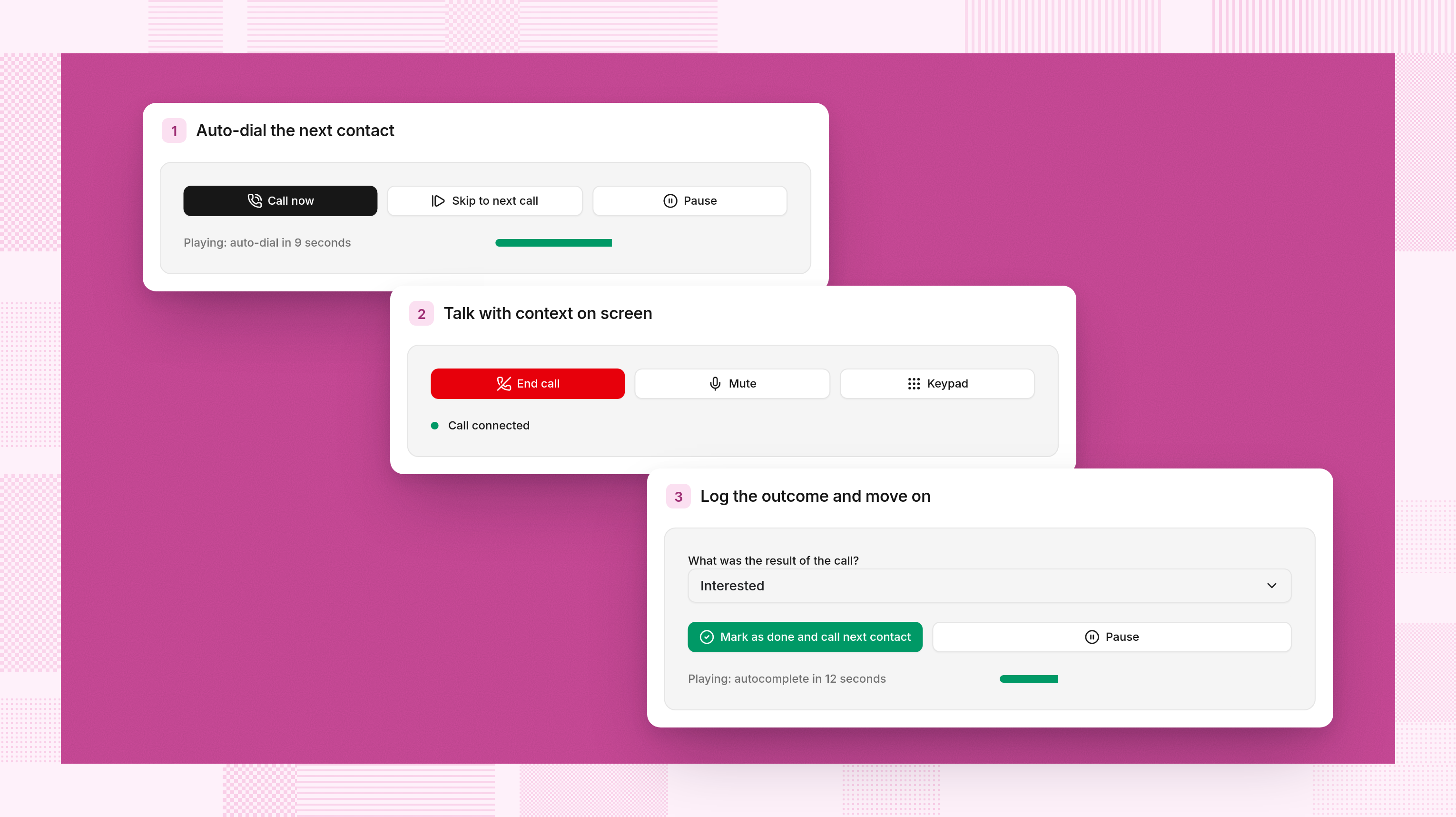
A power dialer automatically calls contacts from a list, one at a time. After a call ends and the sales rep completes any wrap-up steps, it advances to the next contact.
Instead of finding and entering each number, reps work through a queue. Depending on the software, they can review contact details, pause between calls, select outcomes, and trigger follow-up.
The names get confusing, so here’s the useful distinction:
- Power dialing calls contacts sequentially, typically with one active outbound attempt per sales rep.
- Parallel dialing calls multiple numbers simultaneously and connects the rep to an available answer.
- Predictive dialing uses algorithms to pace calls based on expected answers and agent availability.
Vendors use these labels differently, so it’s important to see what happens during an actual calling session.
For a sales rep working a targeted account list, preparation time may matter more than simultaneous dialing. If your opener needs attention too, start with these cold calling scripts. Faster dialing won’t rescue “Just circling back” from itself.
How We Reviewed & Compared Power Dialers
We reviewed vendor product information and pricing, alongside public reviews on G2. Keep in mind this is a research-based comparison, not a hands-on performance test.
Our recommendations consider:
- Preparation: What can sales reps see before calling?
- Dialing controls: Can they pause, skip, and manage the queue?
- Follow-up: Where do notes, outcomes, and next steps go?
- Sales context: Does calling live inside the CRM or connect through an integration?
- Cost: Which plan includes the features you actually need?
The ‘best for’ labels reflect workflow fit, so you get a list of recommendations rather than a universal winner for every sales team.
7 Power Dialer Software Tools to Consider
The best power dialer for you should make life easier before, during, and after each sales call. Getting through a list faster helps, but so does knowing who you’re calling and remembering what you promised.
Let’s review the top power dialer software tools by looking at where each platform fits, which features stand out, and the buying considerations worth a closer look.
Reevo | Best for power dialing, sequences, and CRM in one platform
Reevo’s power dialer lives inside the AI-native sales platform, so it sits alongside your CRM and sequences. The platform suits sales and revenue teams that want calling to connect directly with prospect history and the next outreach step.
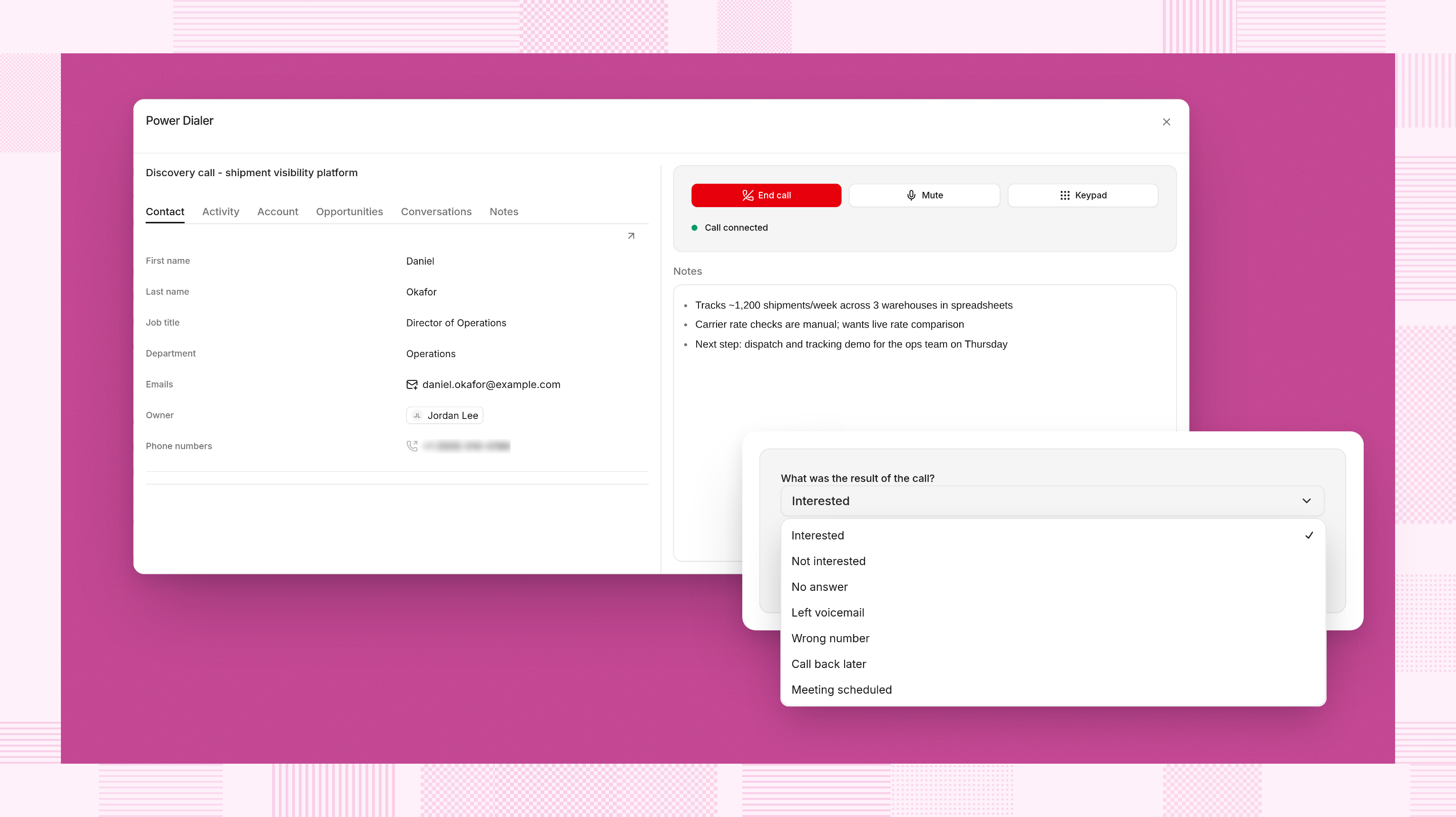
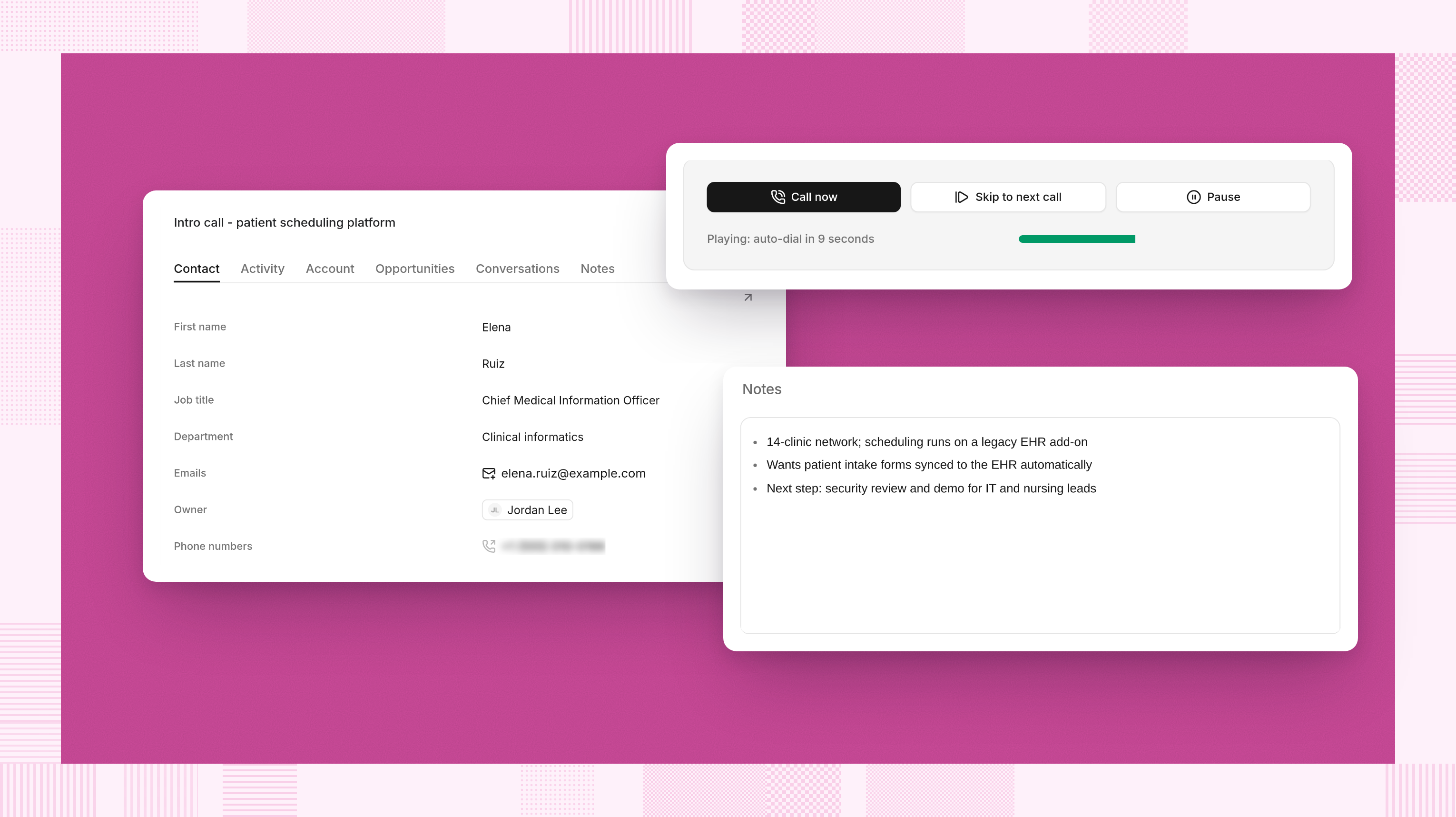
Sales reps add call steps to a sequence, open the Dialer tab, and select “Start power dialer.” Due call tasks form the queue, with an option to prioritize contacts.
Before each call, a 15-second countdown shows contact details, related opportunities, and history. You can also call immediately, skip, or pause. A little breathing room beats greeting a prospect while frantically searching for their name.
Here are Reevo’s standout features:
- Outcomes steer the sequence. Fixed options such as Interested, Call Back Later, and Meeting Scheduled can end, pause, or continue outreach according to each step’s configuration.
- Activity stays with the contact. Calls log automatically, and notes taken during the conversation save to the contact record. Unanswered calls and voicemails can create follow-up tasks.
- Recorded calls get AI analysis. Transcripts, summaries, topics, action items, sentiment, and MEDDIC, SPICED, and BANT scoring support review and coaching.
Overall, Reevo’s sales engagement capabilities bring calling and sequences into the broader sales motion.
One more thing: If you’re already using another CRM or other sales tools, Reevo could still fit your needs. You can integrate over 1,300 tools currently.
Aircall | Best for adding power dialing to your existing CRM
Aircall is a practical power dialer when your CRM is staying put, and you want to improve the calling experience around it.
The power dialer works through a calling queue and brings CRM information into the sales rep’s view. Notes, tags, and follow-up details can flow back into the connected system.
Here are Aircall’s standout features:
- Automatically work through queued phone numbers.
- Show CRM context while reps handle calls.
- Capture notes and tags without separately reconstructing the activity afterward.
Aircall’s approach fits teams that already like their customer database but want fewer manual steps between calls.
One more thing: Test your exact CRM integration. A logo on an integrations page doesn’t tell you whether your custom fields, ownership rules, and follow-up tasks behave the way your team expects in Aircall.
CloudTalk | Best for organizing outbound calling campaigns
CloudTalk is worth considering when managers need to organize calling around campaigns, shared scripts, and consistent outcomes.
The power dialer lets teams build campaigns from CRM lists or CSV files, attach scripts, and assign agents. That gives a calling session more structure than “here’s a spreadsheet, good luck.”
Here are CloudTalk’s standout features:
- Campaigns with scripts and defined call outcomes.
- Access to contact history and notes during calling.
- CRM synchronization to keep call activity connected to customer records.
CloudTalk’s campaign approach is useful when several sales reps work similar lists and managers want a consistent process across them.
One more thing: Compare the complete package. Power dialing, parallel dialing, and AI conversation intelligence are packaged differently, so CloudTalk’s base subscription might not reflect your final cost.
JustCall | Best for combining calling and SMS follow-up
Teams that use calling and texting together should look at JustCall, which helps coordinate those activities around the same prospect.
JustCall’s power dialer supports sequential calling, outcome capture, and campaign follow-up. Calls, recordings, and outcomes attach to the contact, while reattempt rules help bring unanswered contacts back into the queue.
Here are JustCall’s standout features:
- Campaign scripts that appear alongside calls.
- Configurable pauses between dialing attempts.
- Calling and SMS capabilities, including follow-up texts from the campaign’s numbers.
For teams with an established texting strategy, JustCall can reduce the handoff between calling software and a separate messaging tool.
One more thing: Confirm which SMS workflows, calling destinations, and usage allowances your package includes. Also check the registration and consent requirements relevant to your messaging program before turning on automated texts.
Kixie | Best for choosing between single-line and multi-line dialing
Kixie offers separate Single-Line PowerDialer and Multi-Line PowerDialer packages. That makes it worth evaluating when you want to compare dialing approaches while keeping your existing CRM.
Calling contacts individually and placing simultaneous attempts create different sales rep experiences, even when both products carry the PowerDialer name.
Here are Kixie’s standout features:
- Separate packages for single-line and multiline dialing.
- Two-way CRM integration and calling session management.
- Voicemail drop, text messaging, and live call coaching are included.
One more thing: Test the dialing mode your reps will actually use. A multiline demonstration can look impressive, but the relevant question is whether it improves qualified conversations with your list and staffing model.
PhoneBurner | Best for running focused outbound calling sessions
PhoneBurner centers its product on helping sales reps work through outbound lists and handle the repetitive tasks surrounding each conversation.
The power dialer offers power and pause-and-preview modes, so teams can choose a faster rhythm or leave room for preparation before calling.
Standout features:
- Unlimited power dialing across its listed subscription tiers.
- Workflow automation, call dispositions, and one-click voicemails.
- Built-in contact management plus integrations with external CRMs.
That combination makes PhoneBurner a candidate for teams where dedicated calling blocks are a regular part of the day.
One more thing: Feature availability changes by tier. Softphone dialing and live coaching appear in Professional, while call transcription and the AI note-taker appear in Premium. Price the experience you want sales reps to have, including how they’ll place calls.
Close | Best for managing sales in a CRM with built-in calling
Close combines CRM records, communication, and sales automation. It’s a sensible candidate when you’re evaluating the CRM itself alongside the dialer.
Power dialing sits within that sales environment, so teams can manage leads and calling without buying a separate dialer integration.
Here are Close’s standout features:
- Power dialing through contact lists.
- Automatic call logging within lead records.
- Automated workflows covering email, SMS, and call follow-up.
Close’s feature comparison also lists custom call outcomes and voicemail drop on Growth, while predictive dialing and live coaching sit on Scale.
One more thing: Choosing Close is a CRM decision as well as a calling decision, so evaluate pipeline management, migration, reporting, and team adoption alongside the dialing experience. The phone feature can be a fit while the broader CRM still needs consideration.
How to Choose the Right Power Dialer
In a controlled environment, a demo makes any power dialer look perfect. The real test is how it handles your contacts, your follow-up process, and the everyday messiness of selling.
Before buying a power dialer, ask yourself the following questions.
Are you keeping your CRM or replacing it?
If your CRM works well, focus on integration depth. Check where notes, recordings, outcomes, and tasks land.
If reps already spend too much time moving information between tools, evaluate a platform with calling built in. Reevo’s stackless approach starts by bringing those connected activities together.
Which dialing mode fits your sales motion?
A targeted account list may benefit from sequential calling with preparation time. Teams pursuing a different volume strategy may want to evaluate simultaneous dialing.
Ask the vendor to demonstrate pauses, skips, wrap-up time, and what happens when a prospect answers. Product labels can wait outside.
What can sales reps see before saying hello?
Look for relevant history, previous conversations, open opportunities, and a clear reason for calling.
Try a prospect who has already replied to an email or spoken with another teammate. Can the rep see that immediately? Context is only useful if it arrives before the awkward question.
What happens after the call?
Check whether each outcome creates the right next step and prevents inappropriate follow-up. Walk through common outcomes:
- The prospect asks for a callback.
- The number is wrong.
- A meeting gets booked.
- Nobody answers.
Your sales cadence should respond to what happened in the conversation.
Give Sales Reps More Conversations & Fewer Chores
The best power dialer software fits how your team sells and handles the work around each call.
Aircall and CloudTalk are worth evaluating for calling within an existing stack. JustCall brings calling and texting together. Kixie offers different dialing modes, PhoneBurner supports dedicated outbound sessions, and Close combines dialing with sales CRM functionality.
For sales and revenue teams that want to bring the whole sales motion together, Reevo connects power dialing with CRM context, sequences, call outcomes, and post-call intelligence.
Sales reps can prepare, call, and move the prospect forward in Reevo without rebuilding the story across separate systems.
Explore Reevo’s sales engagement platform to see how that workflow fits your team. Fewer chores. More time for the part where someone actually picks up.
Frequently Asked Questions: Power Dialer Software Tools
A force multiplier for sales teams.
Get startedKey takeaways
- Choose a power dialer that fits your CRM, calling strategy, and budget, including add-ons.
- Measure qualified conversations, meetings booked, and time saved, not just dial counts.
- Reevo connects power dialing, CRM, sequences, and post-call AI, with outcomes guiding follow-up.
On this page
Get our newsletter, The GTM Source


