CRM Hygiene: How to Keep Data Clean Without the Cleanup Marathon
Keep CRM data accurate, complete, and current with practical hygiene rules, a daily-to-quarterly checklist, and a scorecard for your team.


You open the CRM to check a deal. 10 minutes later, you’re trying to work out which of three records belongs to the buyer. So much for a quick update.
CRM hygiene is the ongoing work that keeps those records reliable. Done well, it lets your team get on with selling instead of asking, “Can we trust any of this?”
Duplicates are just the start. There's a deal still set to close last Thursday (yes, last Thursday) and an account owner who left six months ago. Apparently, their pipeline lives on.
A cleanup sprint clears the mess for a while. Keeping it from coming back takes a routine that fits how your team works.
Here’s how to build one, with a CRM hygiene checklist and scorecard you can put to use.
What is CRM Hygiene?
CRM hygiene is the ongoing practice of keeping CRM records accurate, complete, consistent, current, and deduplicated so teams can rely on them.
Think about what someone needs to do with the record. Can they reach the buyer, find the owner, or explain why the deal belongs in Commit? Fifty completed fields won’t help if the three you actually need are wrong.
Before fixing that, it helps to separate a few terms that tend to get bundled into the same cleanup request:
Practice | Purpose | When It Happens |
|---|---|---|
CRM Hygiene | Keep records usable through standards, checks, and maintenance | Continuously, with scheduled reviews |
Data Cleansing | Correct existing errors, duplicates, and inconsistent values | During targeted fixes or cleanup projects |
Data Enrichment | Add useful information that’s missing | When a record needs more context |
Data Governance | Define ownership, permissions, standards, and retention rules | When setting policy and reviewing how it’s applied |
Those jobs work together. Governance sets the rules, cleansing fixes the mess, and hygiene keeps an eye on what happens next. CRM data enrichment fills useful gaps; our guide explains that process in detail.
For the records themselves, “clean” comes down to five checks:
- Accurate: the value reflects what’s actually known.
- Complete: the fields needed for this use case are present.
- Consistent: the same information follows the same format.
- Current: the information is recent enough for its purpose.
- Unique: duplicate records aren’t splitting the history.
Unique doesn’t mean everyone with the same name gets merged. Quite a few people are named Chris. Your CRM needs a better reason to decide they’re one person.
Why CRM Data Gets Dirty & What It Costs
Usually, the data gets dirty while everyone’s busy doing their actual job. A sales rep heads into another call. An import uses a different country format. A buyer changes companies and forgets to send your database a farewell note.
Without a few rules around those everyday changes, the problems pile up:
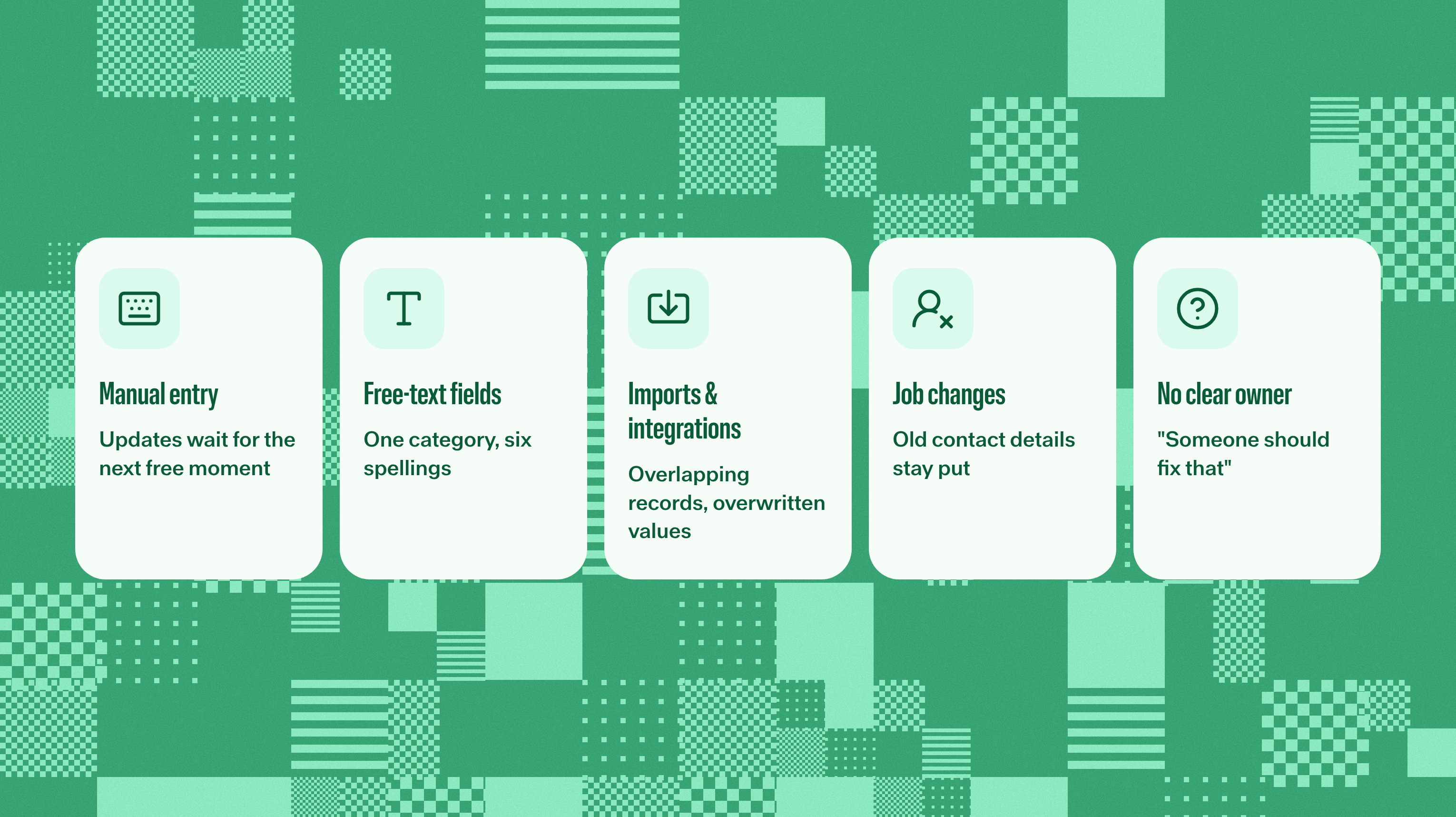
- Manual entry loses to the next customer call, so updates wait.
- Free-text fields give one category six spellings and a personality.
- Imports and integrations add overlapping records or overwrite good values.
- People change jobs while their old contact details stay put.
- “Someone should fix that” never quite becomes someone’s job.
The admin work reps skip often tells you where the process asks for too much typing. Another reminder to “please keep the CRM updated” won’t create more time between calls. It will create another email.
You’re hardly alone if the team has trust issues with its data. In Validity’s 2025 survey of 602 CRM users and stakeholders, 76% said less than half their organization’s CRM data was accurate and complete. That’s what respondents reported about their own systems.
That doubt changes how people work. Leads reach the wrong owner, outreach bounces, and pipeline reviews start with a debate about the dates. Someone opens a spreadsheet “just for this quarter.” You can guess how permanent that becomes.
The cost goes beyond the CRM, too. Gartner cites 2020 research putting the average annual organizational cost of poor data quality at $12.9 million or more. That covers data quality across the business, so it isn’t a CRM cleanup budget.
Closer to home, the cost is the afternoon spent reconciling two reports or explaining why a supposedly healthy deal hasn’t moved. Those are useful clues about what to fix first.
CRM Data Hygiene Best Practices
The answer isn’t a longer cleanup checklist for sales reps to ignore. Start by agreeing on what useful data looks like, then make it easier to maintain. These CRM data hygiene best practices give each problem a home.
1. Define what “clean” means for your team
A new contact and a deal heading to procurement don’t need the same level of detail. Set requirements by object and stage: Identifiers and ownership for the contact; amount, close date, dated next step, and qualification evidence for the later-stage deal.
From there, settle the formats: names, dates, phones, currencies, and allowed values.
“Enterprise,” “ENT,” and “Big ones” shouldn’t share a dashboard. A short standard people can find beats a beautiful policy nobody remembers.
2. Make good entry easier than bad entry
With clear standards, build them into the places people enter data. Picklists keep categories consistent, validation catches unsuitable formats, and stage requirements ask for information when it becomes relevant.
Timing matters. Require an answer before a sales rep could reasonably know it, and “unknown” will become your most popular insight. For imports, a mapped sample lets you catch trouble before it arrives in bulk.
3. Deduplicate with clear matching rules
Duplicates need evidence, too. Email can help match contacts, and domains can help match companies. A company name helps you find candidates, but “Acme” and “Acme” aren’t necessarily the same business.
Once you’ve confirmed the match, decide which values to keep. A verified phone number may deserve priority over a newer imported one. The last system to write a value doesn’t automatically know best. Ownership, activity, relationships, and opt-outs also need a check before the merge.
4. Decide whether to merge, archive, or delete
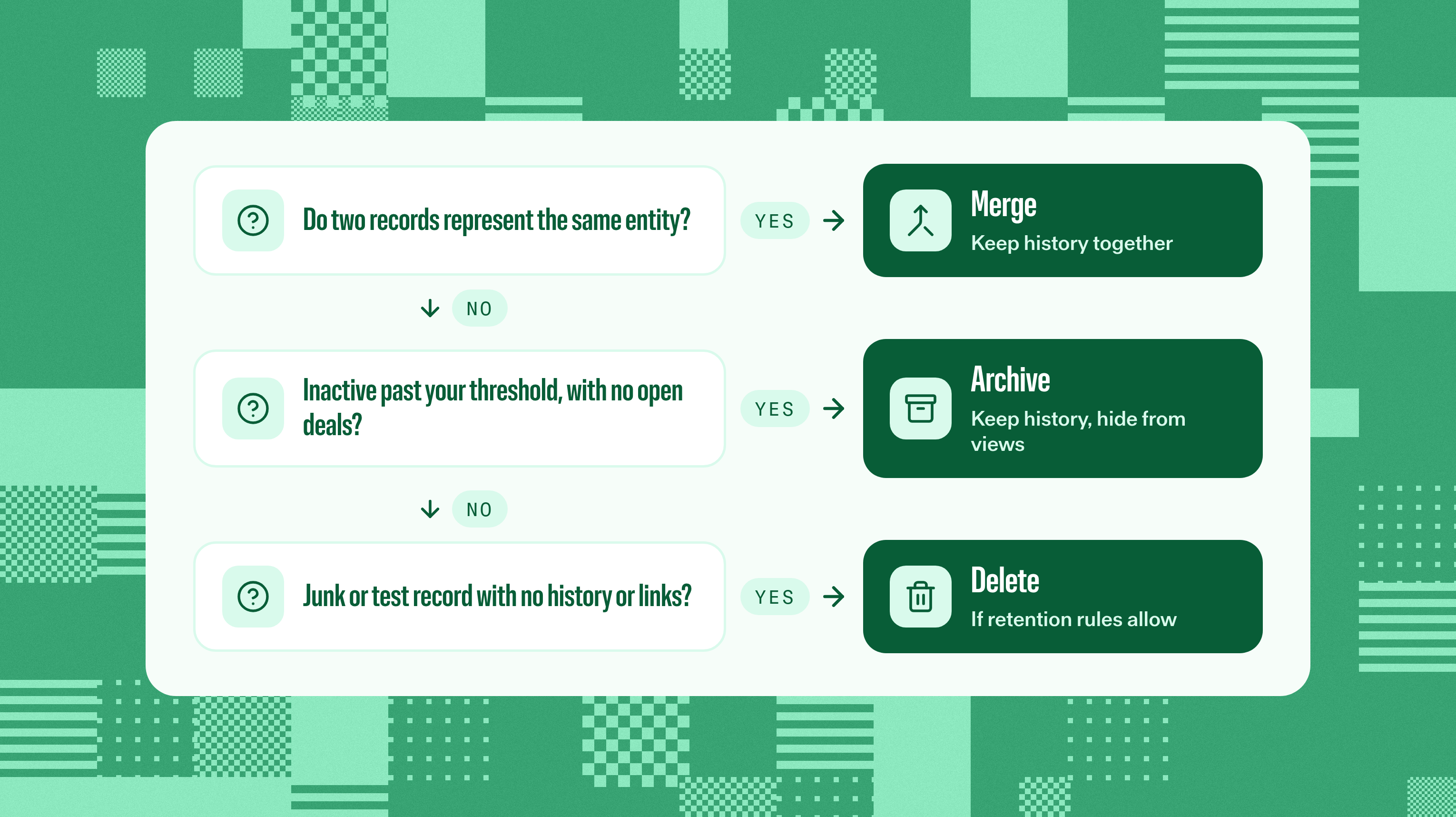
Then comes the button everyone’s tempted to press: delete. Pause long enough to work out whether you’re looking at a duplicate, useful history, or genuine junk. They call for different decisions:
Situation | Usual Action | Check First |
|---|---|---|
Two records represent the same entity | Merge | Choose retained values; check activity, links, ownership, and opt-outs |
A record is inactive past your threshold, with no open deals or active dependency | Archive or deactivate | Confirm retained history and exclusion from active views and reports |
A junk or test record has no useful history or dependencies | Delete, if your retention rules allow it | Check linked records and retain any needed suppression information |
The relationships matter as much as the record. This CRM hygiene discussion follows a familiar problem: Bad leads were converted into contacts, accounts, and opportunities. One bad lead doesn’t make a legitimate account bad. Tracing what’s connected saves a lot of explaining later.
Opt-outs need the same care: Keep the information that stops someone from being contacted again. Test bulk changes on a small batch and keep a backup where appropriate. “The dashboard looked tidier” won’t bring back useful history.
5. Capture activity where the work happens
A rep already had the conversation. Asking them to recreate it in the CRM afterward adds another chance for details to go missing. Automatic activity capture gets more of that work into the record without a second round of typing.
It still needs to land in the right place. Check the contact, company, and deal links where supported. A meeting logged against the right account is useful; it doesn’t magically verify the deal amount or close date. Those need their own checks.
6. Fill useful gaps with enrichment
Once the underlying record is sound, fill the gaps that help someone act: a contact detail for outreach or company information for routing. Your CRM data enrichment process can handle the depth. Enriching three copies of the same person is an expensive way to stay disorganized.
7. Give each role a job
Now make the upkeep someone’s actual responsibility. “We all own data quality” needs a little more detail before the next pipeline review:
Role | Responsibility |
|---|---|
Sales Reps | Keep their contacts and deals accurate; confirm next steps and resolve assigned exceptions |
Sales Managers | Check evidence, close dates, and stalled deals during pipeline reviews |
RevOps / CRM Admins | Own standards, matching rules, permissions, automation, audits, and systemic fixes |
That’s how you keep RevOps teams from getting stuck as data janitors. Sales reps bring the customer context, managers check the deals, and admins fix recurring causes. The same broken field shouldn’t become a weekly favor.
Pipeline Hygiene: Keep Deals Honest
Your contacts can be immaculate while the forecast is quietly writing fiction. Pipeline hygiene needs rules for the deals themselves, especially the fields that determine what looks likely to close.
Give these five a shared meaning across the team:
- Stages need evidence: Agree what qualifies a deal to leave each stage and confirm that it’s captured.
- Close dates need attention: Review past-due dates on open deals and record why a date moves.
- Next steps need an action and a date: “Follow up” is a reminder to make a plan, not the plan itself.
- Amounts and owners need values: Agree how early estimates, currencies, and unknowns are handled.
- Stale deals need a decision: After your inactivity window, confirm a next action, revisit the stage, or close-lost where appropriate.
Set that window around how you sell. A deal waiting on a scheduled procurement review can be quiet for a good reason. A lead nobody’s touched since the webinar probably needs a different conversation.
Repeated date pushes deserve a question, too: what changed in the buyer’s process, and what supports the new date? Moving everything to the end of next month is a calendar adjustment. It isn’t a sales strategy.
Reevo can enforce required stage criteria so a deal doesn’t advance until those requirements are met, and admins can override when there’s a good reason. That’s stage gating: a shared standard, with exceptions handled deliberately.
Bring those checks into the meeting with better pipeline review questions. End with a decision, an owner, and a next step. Otherwise, “please update the CRM” will be back on next week’s agenda, right where everyone left it.
CRM Data Hygiene Checklist by Cadence
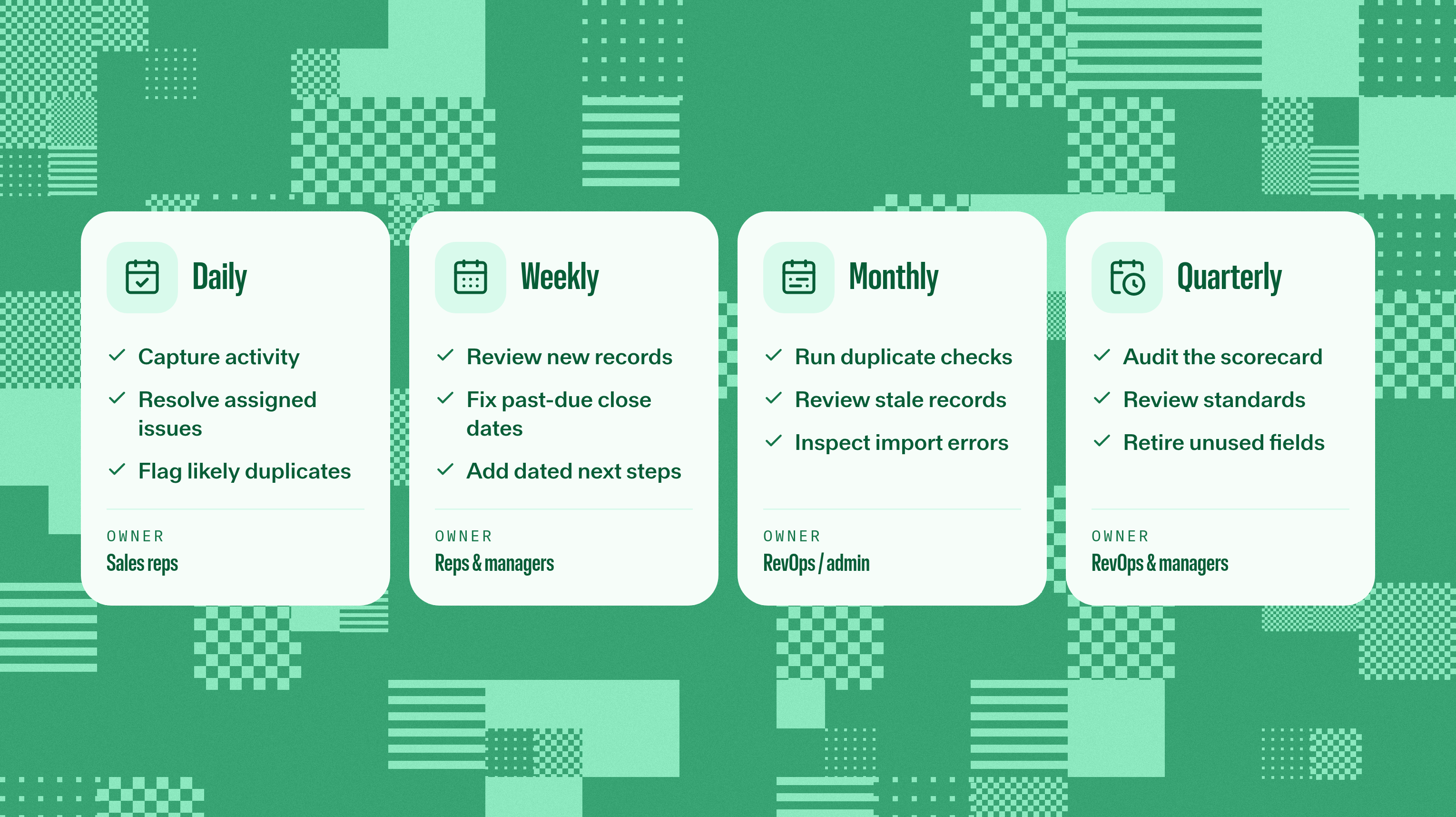
A checklist helps when it fits your workweek. Use this cadence as a starting point, then adjust for record volume, your sales cycle, and how quickly the information changes. The goal is to catch problems while they’re still small enough to recognize.
Cadence | Task | Owner |
|---|---|---|
Daily | Capture activity; resolve assigned quality issues; flag likely new duplicates | Sales reps; admin for capture failures |
Weekly | Review new records, owner gaps, past-due close dates, and deals without dated next steps | Sales reps and sales managers |
Monthly | Run duplicate checks; review stale records; refresh useful enrichment; inspect import and routing errors | RevOps/admin with record owners |
Quarterly | Audit the scorecard; review standards and access; retire unused fields after checking dependencies | RevOps/admin with sales managers |
Automatic capture handles routine logging as work happens. The daily check is for exceptions. Nobody should spend the morning confirming that they sent the emails sitting in their Sent folder.
Weekly reviews turn those exceptions into assignments: Who’s fixing what, and by when? Monthly sweeps tackle the bigger batches, with matching and archive rules agreed before anyone starts clicking through the list.
Quarterly, look at the setup behind the mess. A field nobody uses may be ready to retire, once you’ve checked its reports and automations. A recurring error points to an entry rule, import mapping, or handoff that needs changing.
That routine pays off during a CRM migration, too. You’ll have fewer surprises to pack. Moving systems is a useful quality checkpoint; it shouldn’t be the first time anyone notices the duplicates.
How to Measure CRM Hygiene
An empty cleanup queue feels good. It tells you less if the next import is busy refilling it. Start with a sample of 100 to 200 records across objects, teams, and sources, including the ones that tend to cause trouble. The neatest corner of the CRM can’t speak for the whole database.
Use that sample as your baseline, then set your own targets for these five KPIs:
KPI | How to Measure | Target Direction |
|---|---|---|
Duplicate Rate | Extra records in confirmed duplicate groups ÷ Records assessed | Lower; define match rules first |
Required-Field Completeness | Populated applicable required fields ÷ Applicable required fields checked | Higher; spot-check accuracy too |
Record Freshness | Records verified within your chosen window ÷ Records assessed (Track last activity separately.) | Higher; choose windows by record type |
Open-Deal Exception Rate | Open deals with a past-due close date or missing dated next step ÷ Open deals assessed (Count each deal once) | Lower; track each issue separately too |
Email Bounce Rate | Bounced messages ÷ Messages sent in the period | Lower; separate address errors from other bounce reasons |
Keep the definitions and sampling method steady so the comparison means something. Recent activity tells you something happened, not that every field was verified. And “TBD” can make a field look complete while contributing absolutely nothing.
Pipeline metrics that depend on clean data get easier to interpret as those checks improve. Break results out by team and source, too. An overall average can look perfectly respectable while one import makes a mess.
Automating CRM Hygiene With AI
Rules catch predictable errors, scheduled sweeps surface what slipped through, and automatic capture reduces the typing. Each takes a different piece of the recurring cleanup off someone’s plate.
How do AI agents improve CRM accuracy? They can turn conversations into summaries and suggest fixes for review. The key detail to check is whether a feature records information, recommends a change, or writes it automatically. An “AI-powered” label doesn’t tell you which button has effectively been pressed.
In Reevo, calls, emails, and meetings log to the record automatically, with transcripts and summaries for calls and meetings. New contacts and companies can also be created from email and calendar activity. The conversation gets a record without waiting for Friday’s catch-up session.
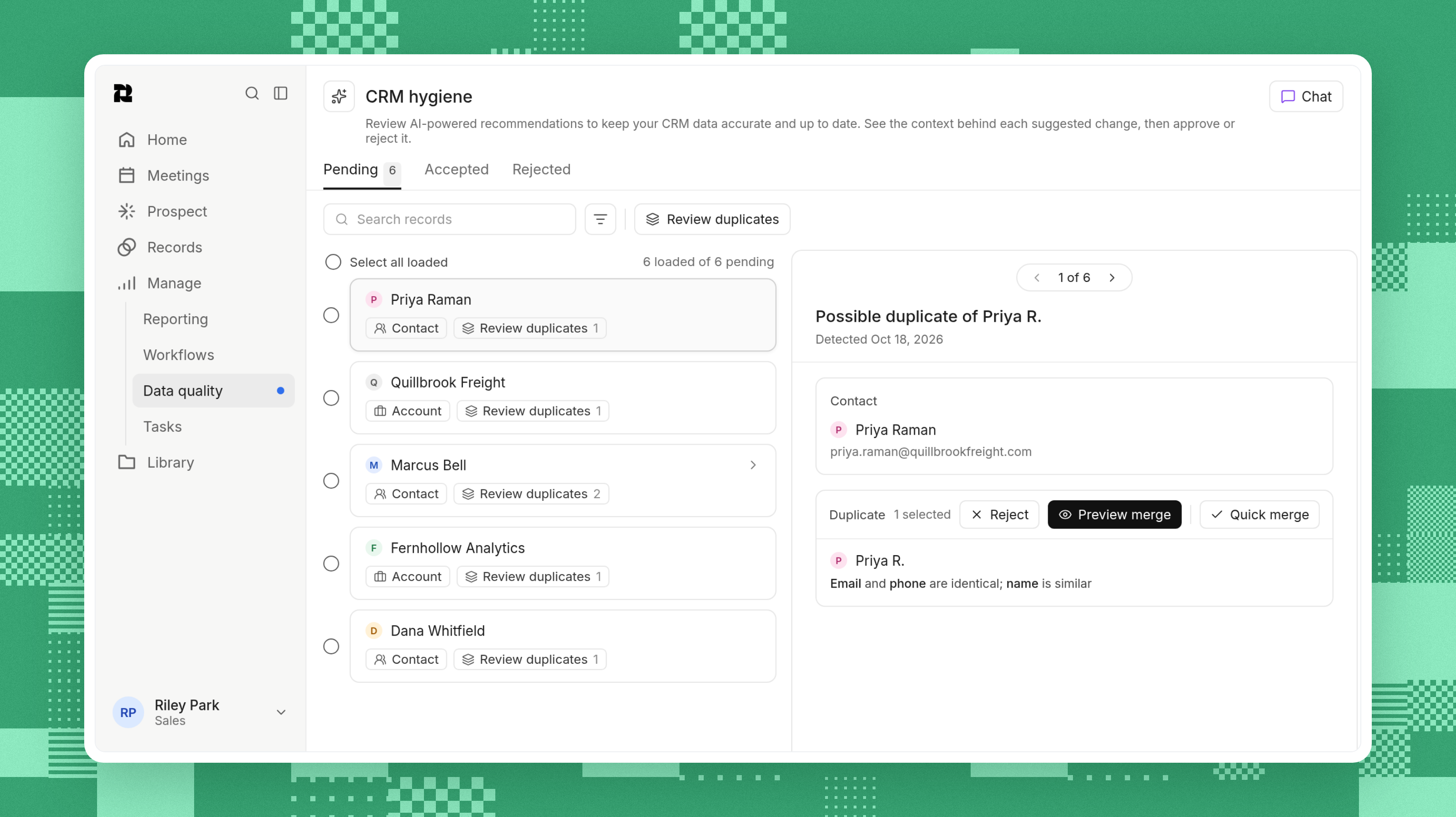
Unique fields, enrichment, import mapping, routing workflows, and scheduled duplicate detection help with the rest. Likely duplicates go to the Data quality review queue, where someone can accept or reject each merge. Field history shows how a value changed over time. That’s how Reevo keeps records current with less dependence on sales reps typing.
Reevo also offers AI help with field updates. Where it suggests a change, someone reviews it before it updates the CRM. Automatic field updates follow the settings in place for your workspace.
Knowing that difference helps you choose what to hand over and what to review. People still handle exceptions and judgment calls, including the crucial question: Does this record reflect what’s actually happening with the customer?
Keep Records Useful, Not Just Tidy
The aim is a CRM you can use without a pre-meeting fact-checking exercise. Clear rules, sensible matching, evidence-backed stages, and named owners get you there. Automatic capture cuts down on the typing required to keep it that way.
Start with a sample and fix the causes that keep returning. Then let the cadence keep you honest. Your next pipeline review should get to the deals before someone has to say, “Hang on, that number isn’t right.”
See how Reevo keeps records current, or take the product tour. Your RevOps team probably has better things to do than run another cleanup marathon.
CRM Hygiene FAQs
A force multiplier for sales teams.
Get startedKey takeaways
- CRM hygiene keeps customer records accurate, current, and usable, so your team can trust what’s in the CRM.
- Clear rules, shared ownership, and regular checks keep CRM cleanup from becoming a recurring calendar event.
- Automate activity capture, review exceptions, and use a scorecard to track whether data quality is improving.
On this page
Get our newsletter, The GTM Source


